Wednesday, 10 June 2020

WiFi Hacking On Tablets

Disclaimer: Don't hack anything where you don't have the authorization to do so. Stay legal.

Ever since I bought my first Android device, I wanted to use the device for WEP cracking. Not because I need it, but I want it :) After some googling, I read that you can't use your WiFi chipset for packet injection, and I forgot the whole topic.

After a while, I read about hacking on tablets (this was around a year ago), and my first opinion was: 
"This is stupid, lame, and the usage of that can be very limited".

After playing one day with it, my opinion just changed: 
"This is stupid, lame, the usage is limited, but when it works, it is really funny :-)"

At the beginning I looked at the Pwn Pad as a device that can replace a pentest workstation, working at the attacker side. Boy was I wrong. Pwn Pad should be used as a pentest device deployed at the victim's side!

You have the following options:
  1. You have 1095 USD + VAT + shipping to buy this Pwn Pad
  2. You have around 200 USD to buy an old Nexus 7 tablet, a USB OTG cable, a USB WiFi dongle (e.g. TP-Link Wireless TL-WN722N USB adapter works).


In my example, I bought a used, old 2012 Nexus WiFi. Originally I bought this to play with different custom Android ROMs, and play with rooted applications. After a while, I found this Pwn Pad hype again and gave it a shot.

The Pwn Pad community edition has an easy-to-use installer, with a proper installation description. Don't forget to backup everything from your tablet before installing Pwn Pad on it!

I don't want to repeat the install guide, it is as easy as ABC. I booted a Ubuntu Live CD, installed adb and fastboot, and it was ready-to-roll. I have not measured the time, but the whole process was around 20 minutes.


The internal WiFi chipset can be used to sniff traffic or even ARP poisoning for active MiTM. But in my case, I was not able to use the internal chipset for packet injection, which means you can't use it for WEP cracking, WPA disauth, etc. This is where the external USB WiFi comes handy. And this is why we need the Pwn Pad Android ROM, and can't use an average ROM.

There are two things where Pwn Pad really rocks. The first one is the integrated drivers for the external WiFi with monitor mode and packet injection capabilities. The second cool thing is the chroot wrapper around the Linux hacking tools. Every hacking tool has a start icon, so it feels like it is a native Android application, although it is running in a chroot Kali environment.

Wifite

The first recommended app is Wifite. Think of it as a wrapper around the aircrack - airmon - airodump suite. My biggest problem with WEP cracking was that I had to remember a bunch of commands, or have the WEP cracking manual with me every time I have to crack it. It was overcomplicated. But thanks to Wifite, that is past.

In order to crack a WEP key, you have to:
  1. Start the Wifite app
  2. Choose your adapter (the USB WiFi)

  3. Choose the target network (wep_lan in the next example)
  4. Wait for a minute 
  5. PROFIT!

SSH reverse shell

This is one of the key functionalities of the Pwn Pad. You deploy the tablet at the Victim side, and let the tablet connect to your server via (tunneled) SSH.

The basic concept of the reverse shells are that an SSH tunnel is established between the Pwn Pad tablet (client) and your external SSH server (either directly or encapsulated in other tunneling protocol), and remote port forward is set up, which means on your SSH server you connect to a localport which is forwarded to the Pwn Pad and handled by the Pwn Pad SSH server.

I believe the best option would be to use the reverse shell over 3G, and let the tablet connect to the victim network through Ethernet or WiFi. But your preference might vary. The steps for reverse shells are again well documented in the documentation, except that by default you also have to start the SSH server on the Pwn Pad. It is not hard, there is an app for that ;-) On your external SSH server you might need to install stunnel and ptunnel if you are not using Kali. The following output shows what you can see on your external SSH server after successful reverse shell.

root@myserver:/home/ubuntu# ssh -p 3333 pwnie@localhost
The authenticity of host '[localhost]:3333 ([127.0.0.1]:3333)' can't be established.
ECDSA key fingerprint is 14:d4:67:04:90:30:18:a4:7a:f6:82:04:e0:3c:c6:dc.
Are you sure you want to continue connecting (yes/no)? yes
Warning: Permanently added '[localhost]:3333' (ECDSA) to the list of known hosts.
pwnie@localhost's password:
  _____      ___  _ ___ ___   _____  _____ ___ ___ ___ ___
 | _ \ \    / / \| |_ _| __| | __\ \/ / _ \ _ \ __/ __/ __|
 |  _/\ \/\/ /| .` || || _|  | _| >  <|  _/   / _|\__ \__ \
 |_|   \_/\_/ |_|\_|___|___| |___/_/\_\_| |_|_\___|___/___/

 Release Version: 1.5.5
 Release Date: 2014-01-30
 Copyright 2014 Pwnie Express. All rights reserved.

 By using this product you agree to the terms of the Rapid Focus
 Security EULA: http://pwnieexpress.com/pdfs/RFSEULA.pdf

 This product contains both open source and proprietary software.
 Proprietary software is distributed under the terms of the EULA.
 Open source software is distributed under the GNU GPL:
 http://www.gnu.org/licenses/gpl.html

pwnie@localhost:~$

Now you have a shell on a machine that is connected to the victim network. Sweet :) Now Metasploit really makes sense on the tablet, and all other command-line tools.

EvilAP and DSniff

Start EvilAP (it is again a wrapper around airobase), choose interface (for me the Internal Nexus Wifi worked), enter an SSID (e.g freewifi), enter channel, choose whether force all clients to connect to you or just those who really want to connect to you, and start.


The next step is to start DSniff, choose interface at0, and wait :) In this example, I used a popular Hungarian webmail, which has a checkbox option for "secure" login (with default off). There are sooo many problems with this approach, e.g. you can't check the certificate before connecting, and the login page is delivered over HTTP, so one can disable the secure login checkbox seamlessly in the background, etc. In this case, I left the "secure" option on default off.


In the next tutorial, I'm going to show my next favorite app, DSploit ;)

Lessons learned

Hacking has been never so easy before
In a home environment, only use WPA2 PSK
Choose a long, nondictionary passphrase as the password for WPA2
Don't share your WiFi passwords with people you don't trust, or change it when they don't need it anymore
Don't let your client device auto-connect to WiFi stations, even if the SSID looks familiar

I believe during an engagement a Pwn Plug has better "physical cloaking" possibilities, but playing with the Pwn Pad Community Edition really gave me fun moments.

And last but not least I would like to thank to the Pwn Pad developers for releasing the Community Edition!

More articles


  1. Hackerone
  2. Pentestmonkey
  3. Pentest Process
  4. Pentest Iso
  5. Pentest Lab Setup
  6. Hacking Link
  7. Pentest Practice
  8. Pentest Iso

DOS (Denial Of Service) Attack Tutorial Ping Of Death ;DDOS

What is DoS Attack?

DOS is an attack used to deny legitimate users access to a resource such as accessing a website, network, emails, etc. or making it extremely slow. DoS is the acronym for Denial oService. This type of attack is usually implemented by hitting the target resource such as a web server with too many requests at the same time. This results in the server failing to respond to all the requests. The effect of this can either be crashing the servers or slowing them down.


Cutting off some business from the internet can lead to significant loss of business or money. The internet and computer networks power a lot of businesses. Some organizations such as payment gateways, e-commerce sites entirely depend on the internet to do business.

In this tutorial, we will introduce you to what denial of service attack is, how it is performed and how you can protect against such attacks.

Topics covered in this tutorial

Types of Dos Attacks

There are two types of Dos attacks namely;

  • DoS– this type of attack is performed by a single host
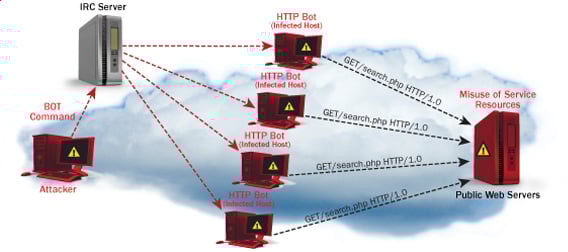
  • Distributed DoS– this type of attack is performed by a number of compromised machines that all target the same victim. It floods the network with data packets.

Ultimate guide to DoS(Denial of Service) Attacks

How DoS attacks work

Let's look at how DoS attacks are performed and the techniques used. We will look at five common types of attacks.

Ping of Death

The ping command is usually used to test the availability of a network resource. It works by sending small data packets to the network resource. The ping of death takes advantage of this and sends data packets above the maximum limit (65,536 bytes) that TCP/IP allows. TCP/IP fragmentation breaks the packets into small chunks that are sent to the server. Since the sent data packages are larger than what the server can handle, the server can freeze, reboot, or crash.

Smurf

This type of attack uses large amounts of Internet Control Message Protocol (ICMP) ping traffic target at an Internet Broadcast Address. The reply IP address is spoofed to that of the intended victim. All the replies are sent to the victim instead of the IP used for the pings. Since a single Internet Broadcast Address can support a maximum of 255 hosts, a smurf attack amplifies a single ping 255 times.  The effect of this is slowing down the network to a point where it is impossible to use it.

Buffer overflow

A buffer is a temporal storage location in RAM that is used to hold data so that the CPU can manipulate it before writing it back to the disc. Buffers have a size limit. This type of attack loads the buffer with more data that it can hold. This causes the buffer to overflow and corrupt the data it holds. An example of a buffer overflow is sending emails with file names that have 256 characters.

Teardrop

This type of attack uses larger data packets. TCP/IP breaks them into fragments that are assembled on the receiving host. The attacker manipulates the packets as they are sent so that they overlap each other. This can cause the intended victim to crash as it tries to re-assemble the packets.

SYN attack

SYN is a short form for Synchronize. This type of attack takes advantage of the three-way handshake to establish communication using TCP. SYN attack works by flooding the victim with incomplete SYN messages. This causes the victim machine to allocate memory resources that are never used and deny access to legitimate users.

DoS attack tools

The following are some of the tools that can be used to perform DoS attacks.

  • Nemesy– this tool can be used to generate random packets. It works on windows. This tool can be downloaded from http://packetstormsecurity.com/files/25599/nemesy13.zip.html . Due to the nature of the program, if you have an antivirus, it will most likely be detected as a virus.
  • Land and LaTierra– this tool can be used for IP spoofing and opening TCP connections
  • Blast– this tool can be downloaded from http://www.opencomm.co.uk/products/blast/features.php
  • Panther- this tool can be used to flood a victim's network with UDP packets.
  • Botnets– these are multitudes of compromised computers on the Internet that can be used to perform a distributed denial of service attack.

DoS Protection: Prevent an attack

An organization can adopt the following policy to protect itself against Denial of Service attacks.

  • Attacks such as SYN flooding take advantage of bugs in the operating system. Installing security patches can help reduce the chances of such attacks.
  • Intrusion detection systems can also be used to identify and even stop illegal activities
  • Firewalls can be used to stop simple DoS attacks by blocking all traffic coming from an attacker by identifying his IP.
  • Routers can be configured via the Access Control List to limit access to the network and drop suspected illegal traffic.

Hacking Activity: Ping of Death

We will assume you are using Windows for this exercise. We will also assume that you have at least two computers that are on the same network. DOS attacks are illegal on networks that you are not authorized to do so. This is why you will need to setup your own network for this exercise.

Open the command prompt on the target computer

Enter the command ipconfig. You will get results similar to the ones shown below

Ultimate guide to DoS(Denial of Service) Attacks

For this example, we are using Mobile Broadband connection details. Take note of the IP address. Note: for this example to be more effective, and you must use a LAN network.

 Switch to the computer that you want to use for the attack and open the command prompt

We will ping our victim computer with infinite data packets of 65500

Enter the following command

ping 10.128.131.108 –t |65500

HERE,

  • "ping" sends the data packets to the victim
  • "10.128.131.108" is the IP address of the victim
  • "-t" means the data packets should be sent until the program is stopped
  • "-l" specifies the data load to be sent to the victim

You will get results similar to the ones shown below

Ultimate guide to DoS(Denial of Service) Attacks

Flooding the target computer with data packets doesn't have much effect on the victim. In order for the attack to be more effective, you should attack the target computer with pings from more than one computer.

The above attack can be used to attacker routers, web servers etc.

If you want to see the effects of the attack on the target computer, you can open the task manager and view the network activities.

  • Right click on the taskbar
  • Select start task manager
  • Click on the network tab
  • You will get results similar to the following

Ultimate guide to DoS(Denial of Service) Attacks

If the attack is successful, you should be able to see increased network activities.


Hacking Activity: Launch a DOS attack

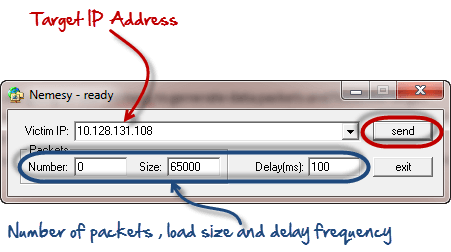
In this practical scenario, we are going to use Nemesy to generate data packets and flood the target computer, router or server.

As stated above, Nemesy will be detected as an illegal program by your anti-virus. You will have to disable the anti-virus for this exercise.

Ultimate guide to DoS(Denial of Service) Attacks

Enter the target IP address, in this example; we have used the target IP we used in the above example.

HERE,

  • 0 as the number of packets means infinity. You can set it to the desired number if you do not want to send, infinity data packets
  • The size field specifies the data bytes to be sent and the delay specifies the time interval in milliseconds.


Click on send button

You should be able to see the following results

Ultimate guide to DoS(Denial of Service) Attacks

The title bar will show you the number of packets sent

Click on halt button to stop the program from sending data packets.

You can monitor the task manager of the target computer to see the network activities.

Summary

  • A denial of service attack's intent is to deny legitimate users access to a resource such as a network, server etc.
  • There are two types of attacks, denial of service and distributed denial of service.
  • A denial of service attack can be carried out using SYN Flooding, Ping of Death, Teardrop, Smurf or buffer overflow
  • Security patches for operating systems, router configuration, firewalls and intrusion detection systems can be used to protect against denial of service attacks.
@EVERYTHING NT

Related news


OSIF: An Open Source Facebook Information Gathering Tool


About OSIF
   OSIF is an accurate Facebook account information gathering tool, all sensitive information can be easily gathered even though the target converts all of its privacy to (only me), sensitive information about residence, date of birth, occupation, phone number and email address.

For your privacy and security, i don't suggest using your main account!

OSIF Installtion
   For Termux users, you must install python2 and git first:
pkg update upgrade
pkg install git python2


   And then, open your Terminal and enter these commands:   If you're Windows user, follow these steps:
  • Install Python 2.7.x from Python.org first. On Install Python 2.7.x Setup, choose Add python.exe to Path.
  • Download OSIF-master zip file.
  • Then unzip it.
  • Open CMD or PowerShell at the OSIF folder you have just unzipped and enter these commands:
    pip install -r requirements.txt
    python osif.py

Before you use OSIF, make sure that:
  • Turn off your VPN before using this tool.
  • Do not overuse this tool.
  • if you are confused how to use it, please type help to display the help menu or watch the video below.

How to use OSIF?


Related word


Tuesday, 9 June 2020

macSubstrate - Tool For Interprocess Code Injection On macOS


macSubstrate is a platform tool for interprocess code injection on macOS, with the similar function to Cydia Substrate on iOS. Using macSubstrate, you can inject your plugins (.bundle or .framework) into a mac app (including sandboxed apps) to tweak it in the runtime.
  • All you need is to get or create plugins for your target app.
  • No trouble with modification and codesign for the original target app.
  • No more work after the target app is updated.
  • Super easy to install or uninstall a plugin.
  • Loading plugins automatically whenever the target app is relaunched.
  • Providing a GUI app to make injection much easier.

Prepare
  • Disable SIP
  • Why should disable SIP
    System Integrity Protection is a new security policy that applies to every running process, including privileged code and code that runs out of the sandbox. The policy extends additional protections to components on disk and at run-time, only allowing system binaries to be modified by the system installer and software updates. Code injection and runtime attachments to system binaries are no longer permitted.

Usage
  1. download macSubstrate.app, put into /Applications and launch it.
    StatusBar
  2. grant authorization if needed.
  3. install a plugin by importing or dragging into macSubstrate.
    ToInstall
  4. launch the target app.
    step 3 and step 4 can be switched
    Once a plugin is installed by macSubstrate, it will take effect immediately. But if you want it to work whenever the target app is relaunched or macOS is restarted, you need to keep macSubstrate running and allow it to automatically launch at login.
  5. uninstall a plugin when you do not need it anymore.
    Installed

Plugin
macSubstrate supports plugins of .bundle or .framework, so you just need to create a valid .bundle or .framework file. The most important thing is to add a key macSubstratePlugin into the info.plist, with the dictionary value:
Key Value
TargetAppBundleID the target app's CFBundleIdentifier, this tells macSubstrate which app to inject.
Description brief description of the plugin
AuthorName author name of the plugin
AuthorEmail author email of the plugin
Please check the demo plugins demo.bundle and demo.framework for details.

Xcode Templates
macSubstrate also provides Xcode Templates to help you create plugins conveniently:
  1. ln -fhs ./macSubstratePluginTemplate ~/Library/Developer/Xcode/Templates/macSubstrate\ Plugin
  2. Launch Xcode, and there will be 2 new plugin templates for you.

Security
  1. SIP is a new security policy on macOS, which will help to keep you away from potential security risk. Disable it means you will lose the protection from SIP.
  2. If you install a plugin from a developer, you should be responsible for the security of the plugin. If you do not trust it, please do not install it. macSubstrate will help to verify the code signature of a plugin, and I suggest you to scan it using VirusTotal. Anyway, macSubstrate is just a tool, and it is your choice to decide what plugin to install.


Related word

  1. Hacker Videos
  2. Pentest Windows 7
  3. Pentest Smtp
  4. Hacker Code
  5. Pentest As A Service
  6. Pentest Web Application
  7. Hacking Online Games
  8. Hacker Forum
  9. Hacker Wifi Password
  10. Pentest Dns
  11. Hacking Ethics
  12. Pentest Example Report
  13. Hacking Ethics
  14. Hacker0Ne
  15. Pentest With Metasploit

How To Hack Any Whatsapp Account In 2020

The article will also be broken down into different subtopics and subcategories. This to make it easy for those who are just interested in skimming through the article to pick the part of WhatsApp hack they are most interested in. Just incase you don't have enough time to go through the entire article.

Search queries like these are a common place; Can WhatsApp be hacked? Can you read WhatsApp messages? How safe is the most popular trade fair in the world? This article gives you all the solution you need to hack any WhatsApp account, as well as how to protect yourself from a WhatsApp hack attack.

Although the messenger is now on an end-to-end encryption, WhatsApp is still not totally safe from espionage. WhatsApp chats and messages can still be accessed and read remotely, and old &deleted WhatsApp chats and messages retrieved.

WhatsApp Spy: Hack WhatsApp Chats and Messages

A very simple solution is to use a software that can hack WhatsApp remotely. All manufacturers offer to read the WhatsApp messages an extra web portal. In addition to the Whatsapp messages but can also spy on other messengers. So you can also have access to social media accounts.

The software may only be installed on a smartphone. If the user of the smartphone has been informed about the installation and effects.

WhatsApp Hacker: 3 Steps to Hack WhatsApp in 2020

You can hack Whatsapp using a second cell phone. No extra SIM card is necessary for this. The guide also works with a tablet. With this method, the other phone only needs to clone WhatsApp messages is internet connection.

The trick to hack Whatsapp successfully is not a software bug. It's the way WhatsApp has developed the setup wizard. Since there are no user accounts with passwords and you log in via the mobile number, here lies the vulnerability. But you can also protect yourself from the Whatsapp hack.

Hack WhatsApp Chat with the Best WhatsApp Hacking Tool

To read Whatsapp messages, the mobile phone number of the target must be known. The cell phone can remain locked. There is no need to install software to hack and read Whatsapp messages. Even with the PIN or fingerprint, the Whatsapp account can be hacked.

STEP 1: Create a New WhatsApp Account

To hack an account from Whatsapp, the app from the App Store must be installed on the second cell phone. After the installation of Whatsapp, target's phone number is entered. A confirmation request must be waited until access to the smartphone of the victim exists.

STEP 2: WhatsApp Account Confirmation

The confirmation of the Whatsapp account is the actual security risk of the messenger. Whatsapp usually confirms the registration via SMS. Occasionally the confirmation will also be sent by automated phone call via a phone call.

Calls and text messages can be read and taken by anyone even when the screen is locked. So that the WhatsApp hack does not stand out, the SMS must be removed from the start screen by swiping.

STEP 3: Enter Confirmation

The stolen verification PIN is now entered on the second smartphone. As a result, the WhatsApp account has been taken over by you. You can read the WhatsApp messages, which respond to this mobile phone number.

The downside to this trick is that the victim immediately notices the Whatsapp hack as soon as Whatsapp is opened. If the victim goes through the sign-in process again. The attacker loses access to the messages and no Whatsapp messages can be read.

How to Hack Someone's WhatsApp in 2020

A good way to hack a WhatsApp account is to hack whatsapp online. Here you can read WhatsApp messages via a browser and also write. The target user can continue to use his cell phone (works for iOS, Android phone etc) and does not notice the WhatsApp hack.

STEP 1: Access the Cell Phone

In order to be able to read WhatsApp messages by installing software. Access to the unlocked smartphone is required for a short time. In addition, cell phone, a computer or laptop is necessary. On this the Whatsapp messages will be read later.

STEP 2: Access WhatsApp Web

If you have access to the unlocked smartphone, Whatsapp must be started there. The Whatsapp settings include Whatsapp Web . If this is selected, Whatsapp opens a QR code scanner with the hint to open WhatsApp Web in the browser.

If the QR code is scanned in the browser with the smartphone. There is a permanent connection and Whatsapp messages can be read. If you want to hack Whatsapp in this way. You have full access to all incoming messages and you can even write messages yourself.

STEP 3: Read WhatsApp Messages

The target usually sees this Whatsapp hack only when the settings are invoked to Whatsapp Web in the app. Whatsapp messages can be read via the browser. Regardless of whether the smartphone is on home Wi-Fi or on the move. You can also hack group chats admin by just having any of the contact details.

WhatsApp Hack: How to Hack any WhatsApp account

Which is the most popular messaging app globally? Of course, you can use different apps from Android or iOS to send and receive messages. But Whatsapp remains everyone's favorite globally!

Whatsapp is one of the popular apps in the world. There are more than 2 billion active users on Whatsapp, messaging daily with the app. Why do people love WhatsApp? Whatsapp is very convenient and easy to use.

Other messaging apps like Facebook Messenger, still needs a special account to sign up for this app. If you change a new app, you'll need to add another account. This can be stressful, as you have to remember a lot of new passwords and usernames.

HACKER NT

Continue reading


PortWitness - Tool For Checking Whether A Domain Or Its Multiple Sub-Domains Are Up And Running


PortWitness is a bash tool designed to find out active domain and subdomains of websites using port scanning. It helps penetration testers and bug hunters collect and gather information about active subdomains for the domain they are targeting.PortWitness enumerates subdomains using Sublist3r and uses Nmap alongwith nslookup to check for active sites.Active domain or sub-domains are finally stored in an output file.Using that Output file a user can directly start testing those sites.
Sublist3r has also been integrated with this module.It's very effective and accurate when it comes to find out which sub-domains are active using Nmap and nslookup.
This tool also helps a user in getting the ip addresses of all sub-domains and stores then in a text file , these ip's can be used for further scanning of the target.

Installation
git clone https://github.com/viperbluff/PortWitness.git

BASH
This tool has been created using bash scripting so all you require is a linux machine.

Usage
bash portwitness.sh url


More information


Blockchain Exploitation Labs - Part 2 Hacking Blockchain Authorization


Bypassing Blockchain Authorization via Unsecured Functions


Note: Since the first part of this series I have also uploaded some further videos on remediation of reentrancy and dealing with compiler versions when working with this hacking blockchain series.  Head to the console cowboys YouTube account to check those out.  Haha as mentioned before I always forget to post blogs when I get excited making videos and just move on to my next project… So make sure to subscribe to the YouTube if you are waiting for any continuation of a video series.. It may show up there way before here. 

Note 2:  You WILL run into issues when dealing with Ethereum hacking, and you will have to google them as versions and functionality changes often... Be cognizant of versions used hopefully you will not run into to many hard to fix issues. 

In the second part of this lab series we are going to take a look at privacy issues on the blockchain which can result in a vulnerably a traditional system may  not face. Since typically blockchain projects are open source and also sometimes viewable within blockchain explorers but traditional application business logic is not usually available to us. With traditional applications we might not find these issues due to lack of knowledge of internal functionality or inability to read private values on a remote server side script.  After we review some issues we are going to exploit an authorization issues by writing web3.js code to directly bypass vertical authorization restrictions.

Blockchain projects are usually open source projects which allow you to browse their code and see what's going on under the hood.  This is fantastic for a lot of reasons but a developer can run into trouble with this if bad business logic decisions are deployed to the immutable blockchain.  In the first part of this series I mentioned that all uploaded code on the blockchain is immutable. Meaning that if you find a vulnerability it cannot be patched. So let's think about things that can go wrong..

A few things that can go wrong:
  • Randomization functions that use values we can predict if we know the algorithm
  • Hard-coded values such as passwords and private variables you can't change.
  • Publicly called functions which offer hidden functionality
  • Race conditions based on how requirements are calculated

Since this will be rather technical, require some setup and a lot of moving parts we will follow this blog via the video series below posting videos for relevant sections with a brief description of each.  I posted these a little bit ago but have not gotten a chance to post the blog associated with it.  Also note this series is turning into a full lab based blockchain exploitation course so keep a lookout for that.

In this first video you will see how data about your project is readily available on the blockchain in multiple formats for example:
  • ABI data that allows you to interact with methods.
  • Actual application code.
  • Byte code and assembly code.
  • Contract addresses and other data.

 Lab Video Part 1: Blockchain OSINT: 


Once you have the data you need to interact with a contract on the blockchain via some OSINT how do you actually interface with it? That's the question we are going to answer in this second video. We will take the ABI contract array and use it to interact with methods on the blockchain via Web3.js and then show how this correlates to its usage in an HTML file

Lab Video Part 2: Connecting to a Smart Contract: 


Time to Exploit an Application:

Exploit lab time, I created an vulnerable application you can use to follow along in the next video. Lab files can be downloaded from the same location as the last blog located below. Grab the AuthorizationLab.zip file:

Lab file downloads:


Ok so you can see what's running on the blockchain, you can connect to it, now what?   Now we need to find a vulnerability and show how to exploit it. Since we are talking about privacy in this blog and using it to bypass issues. Lets take a look at a simple authorization bypass we can exploit by viewing an authorization coding error and taking advantage of it to bypass restrictions set in the Smart Contract.  You will also learn how to setup a local blockchain for testing purposes and you can download a hackable application to follow along with the exercises in the video..

Lab Video Part 3:  Finding and hacking a Smart Contract Authorization Issue: 


Summary:

In this part of the series you learned a lot, you learned how to transfer your OSINT skills to the blockchain. Leverage the information found to connect to that Smart Contract. You also learned how to interact with methods and search for issues that you can exploit. Finally you used your browsers developer console as a means to attack the blockchain application for privilege escalation.

Related articles